

The Risk Isn't Where Your Club's Data Lives. It's How Old It Is.
Justin Roberts
September 16, 2026
Select records across memberships, licences or web leads and email them directly — each recipient automatically sees their own details, no exports needed.

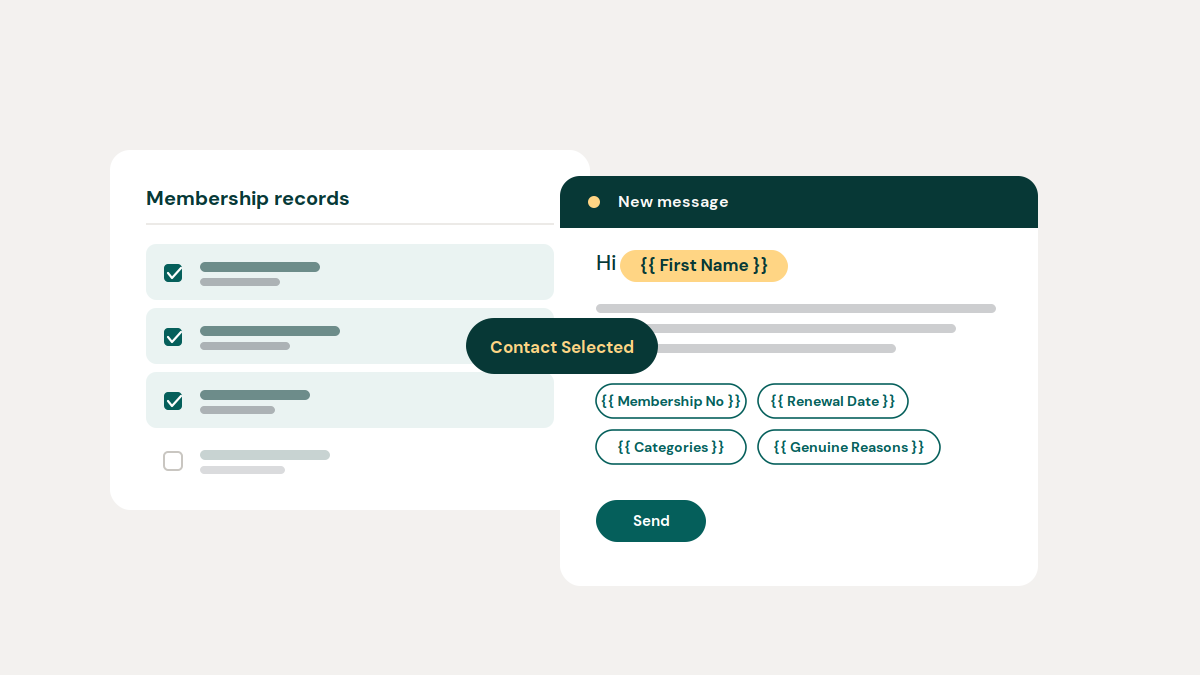
Contacting a specific group of people has usually meant a detour before you could actually write the email — export a list, find the right addresses, maybe build a campaign, then start personalising. SquadSpot now skips all of that. You can select records directly wherever you're already looking at them, and email that group on the spot.
This works the same way across the platform, wherever a record has an email address attached:
The workflow is the same everywhere: tick the checkboxes next to the people you want, open Manage Selected, choose Contact Selected, and write the email.
The composer knows where you came from. Select licence holders and you're writing around licence information; select memberships and you're writing around membership information. You're not filling in a generic form — the context follows you in.
The real change is what you can put inside that email. Rather than writing "Hi there" to a group, you can write:
Hi {{ First Name }},
Your membership {{ Club Membership No }} is due for renewal on {{ Club Membership Expiry }}.
Send that to twenty people and twenty different emails go out — Fred sees "Hi Fred" and his own renewal date, Bill sees "Hi Bill" and his. You write it once. Type {{ in the editor or open the placeholder selector, and insert whatever's relevant: membership number, renewal date, categories, genuine reasons, licence expiry, addresses, member labels, join date, range access — whatever's already sitting on that record. The exact list of available placeholders adjusts depending on where you're sending from, so you're only ever offered what actually applies.
None of this is a marketing tool bolted on the side. It's the fastest way to turn "I need to tell these people something" into an email that's already on its way — without an export, a spreadsheet, or typing the same details in by hand twenty times over.
Next time you need to reach a specific group — a batch of renewals, a set of licence holders, a handful of leads — select them where you already are, hit Contact Selected, and let SquadSpot fill in the details.
More on this is coming — including how tags work across these same filters and modules.

